REST API Endpoint Naming Conventions: 10 Rules With Examples
By Byteary Team · Sep 24, 2026 · 3 min read
An API's URLs are its user interface for developers. When they follow a consistent pattern, people can guess an endpoint they have never seen. When every team invents its own style, every integration starts with a hunt through the documentation. These ten rules cover the decisions that come up in almost every REST API.
Resources are nouns; methods are verbs
1. Use nouns for resources, not verbs. The HTTP method already says what you are doing.
| Avoid | Use |
|---|---|
GET /getOrders | GET /orders |
POST /createOrder | POST /orders |
POST /orders/12/delete | DELETE /orders/12 |
POST /updateOrderStatus | PATCH /orders/12 |
2. Use plural collection names. /orders is the collection and /orders/12 is one item in it. Mixing /order/12 and /customers forces people to remember which is which.
3. Use each method for its purpose. GET reads and never changes data, POST creates, PUT replaces a whole resource, PATCH updates some fields, DELETE removes. The HTTP Status Code Lookup shows which status each should return - for example 201 Created after a POST.
Formatting paths
4. Lowercase, with one word separator. URLs are case-sensitive, so /Orders and /orders are different paths. Kebab-case (/blog-posts) is the most common choice; whatever you choose, never mix it with snake_case in the same API.
5. No trailing slashes and no file extensions. /orders/ and /orders.json create duplicate URLs. Use the Accept header to request a format.
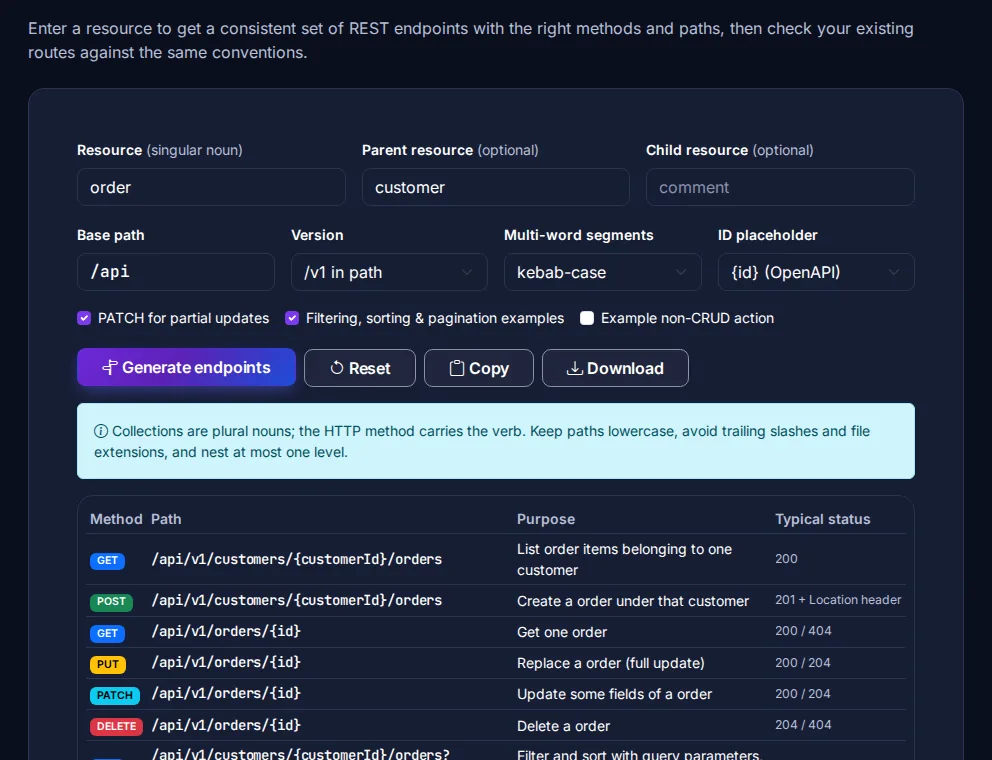
The API Endpoint Naming Generator applies these rules for you: enter a resource such as "order" and a parent such as "customer", and it lists every endpoint with its method and typical status code. Paste existing routes into its review box to spot verbs, capitals and trailing slashes.
Relationships
6. Nest one level at most. GET /customers/42/orders clearly means "orders of customer 42". But /customers/42/orders/12/items/3 forces clients to know three IDs to fetch one item. Give every resource a top-level route for single items - GET /orders/12, GET /items/3 - and use nesting only to list or create children.
Filtering, sorting and pagination
7. Use query parameters, not new paths.
GET /orders?status=paid&customer_id=42
GET /orders?sort=-created_at
GET /orders?page=2&per_page=25
GET /orders?cursor=eyJpZCI6MTIzfQ
Avoid /orders/paid or /orders/by-customer/42 - each filter would become a new endpoint. A leading minus for descending sort (-created_at) is a widely used convention, and cursor-based pagination is more reliable than page numbers for large or fast-changing lists.
Versions and actions
8. Version the API from day one. /api/v1/orders is the simplest scheme to understand and to route. Header-based versioning is cleaner in theory but harder to test in a browser or with curl. Only increase the version for breaking changes.
9. Model real actions as sub-resources, sparingly. Some operations are not CRUD - publishing, cancelling, resending. POST /orders/12/cancel is acceptable when a state change has side effects; if it is just a field change, PATCH /orders/12 with {"status": "cancelled"} is simpler.
10. Be consistent in the body, too. Pick one case for JSON fields (created_at or createdAt), one date format (ISO 8601), and one error shape - RFC 9457 problem details is a good standard to adopt.
Document it
Once the names are settled, write them down. The API Documentation Generator turns a list of endpoints into a Markdown reference with curl examples, and the OpenAPI Validator checks a spec if you use OpenAPI. To try requests while you build, use the API Request Builder.