Dockerfile Best Practices: Smaller, Faster and Safer Images
By Byteary Team · Sep 25, 2026 · 4 min read
A Dockerfile that works is easy to write. One that builds in seconds instead of minutes, produces an image a tenth of the size, and does not ship your .env file to a registry takes a few more lines. Here is a typical first Dockerfile, what is wrong with it, and how to fix each problem.
The starting point
FROM node:latest
COPY . .
RUN npm install
EXPOSE 3000
CMD npm start
It runs, but: the base image changes without warning, every code change reinstalls all dependencies, the image contains dev dependencies and build tools, it runs as root, and COPY . . sends everything in the folder - including .git and .env - into the image.
1. Pin the base image and keep it small
latest means a different image every few weeks, so a build that worked on Monday can fail on Friday. Pin a specific version - node:20-alpine, python:3.12-slim, php:8.3-fpm-alpine - and update it deliberately. The -slim and -alpine variants are hundreds of megabytes smaller than the full images; Alpine uses musl instead of glibc, which occasionally matters for native modules.
2. Order instructions for the build cache
Docker reuses a cached layer until one of its inputs changes, and every layer after it is rebuilt. Copy the dependency manifest first, install, then copy the source code:
WORKDIR /app
COPY package.json package-lock.json ./
RUN npm ci --omit=dev
COPY . .
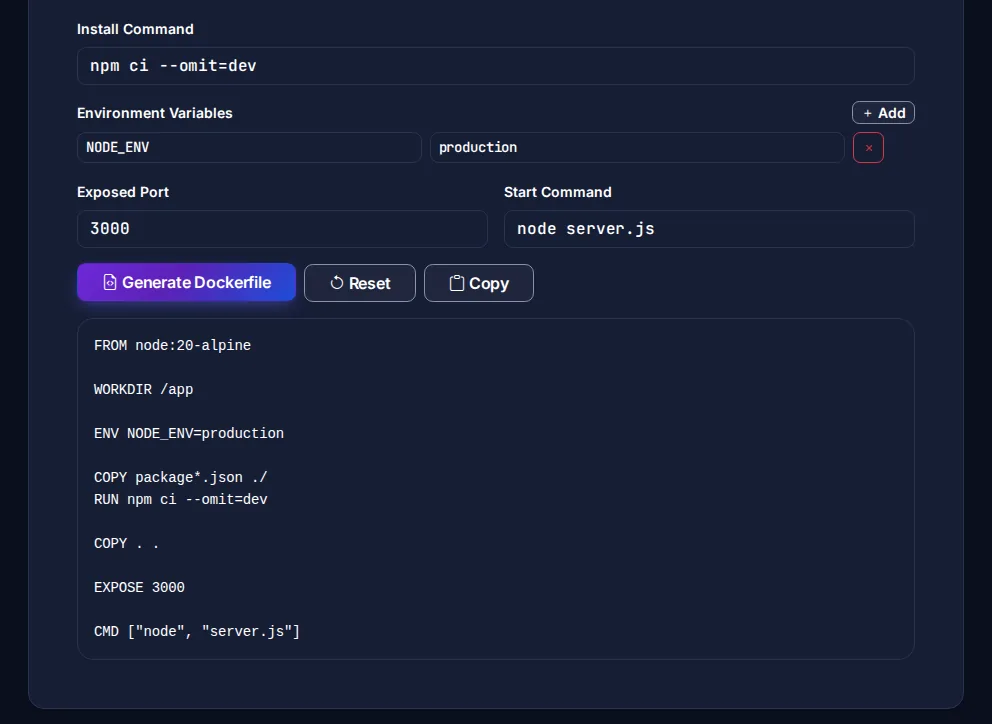
Now a code change only rebuilds the last layer; dependencies are reinstalled only when the lockfile changes. npm ci installs exactly what the lockfile says, which is what you want in an image. The Dockerfile Generator writes this structure for you.
3. Add a .dockerignore
The build context is everything in the folder, sent to the Docker engine before the build starts. Exclude what the image does not need:
.git
node_modules
.env
*.log
coverage
Dockerfile
docker-compose*.yml
This speeds up builds and keeps secrets and history out of the image. The .dockerignore Generator has templates per language.
4. Use a multi-stage build
Build tools, compilers and dev dependencies are needed to build the app, not to run it. A multi-stage build keeps them out of the final image:
FROM node:20-alpine AS build
WORKDIR /app
COPY package.json package-lock.json ./
RUN npm ci
COPY . .
RUN npm run build

FROM node:20-alpine
WORKDIR /app
ENV NODE_ENV=production
COPY package.json package-lock.json ./
RUN npm ci --omit=dev
COPY --from=build /app/dist ./dist
USER node
EXPOSE 3000
CMD ["node", "dist/server.js"]
5. Do not run as root
By default, processes in a container run as root. If the app is compromised, the attacker is root inside the container, which makes escaping it easier. Official Node images include a node user; for others, create one with adduser and switch with USER before the CMD.
6. Use the exec form of CMD
CMD ["node", "server.js"] runs your process directly as PID 1, so it receives the SIGTERM that docker stop sends and can shut down cleanly. The shell form, CMD npm start, wraps it in a shell that may not forward the signal - Docker then waits ten seconds and kills the container.
7. Keep secrets out of the image
Anything written with ENV, ARG or COPY is stored in the image layers and visible with docker history - even if a later step deletes it. Pass runtime secrets as environment variables when the container starts (see .env best practices), and for build-time secrets use BuildKit secret mounts: RUN --mount=type=secret,id=npm_token ....
8. Clean up in the same layer
On Debian-based images, install system packages and remove the package cache in one RUN, otherwise the cache stays in an earlier layer:
RUN apt-get update \
 && apt-get install -y --no-install-recommends curl \
 && rm -rf /var/lib/apt/lists/*
For more detail, Docker's own building best practices page is worth reading. To run the image alongside a database, the Docker Compose Generator writes the compose file, and a Makefile gives everyone the same make docker-build command.