How to Speed Up Your Website with Compression, Caching and a CDN
By Byteary Team · Sep 21, 2026 · 4 min read
When a site feels slow, the first instinct is to blame the code or the hosting plan. In practice, a large share of slow sites are simply missing three pieces of server configuration that take minutes to fix: compression, caching and a CDN. Check those first.
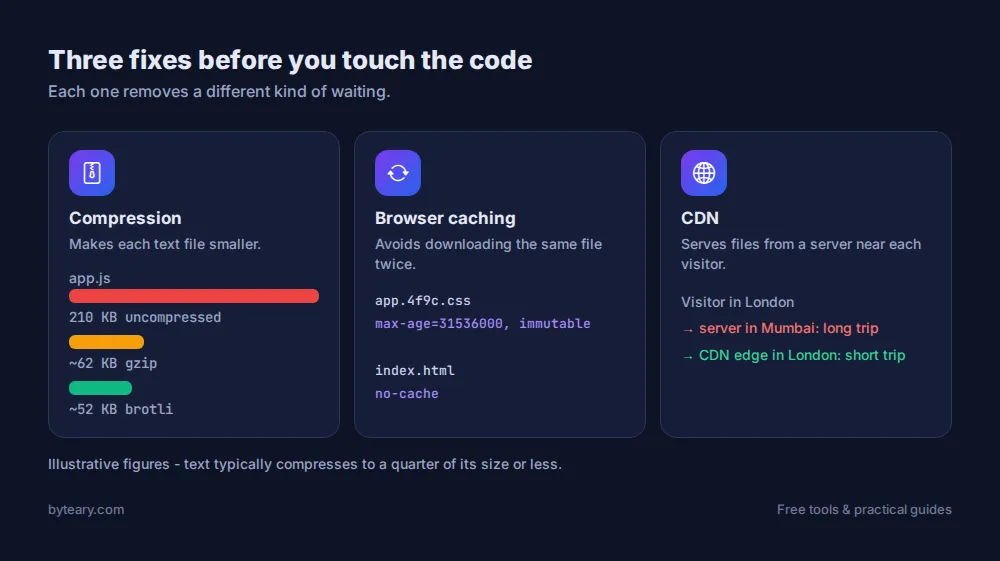
1. Compression: send fewer bytes
HTML, CSS, JavaScript, JSON and SVG are text, and text compresses extremely well - often to a quarter of its size or less. The browser announces which formats it understands, and the server compresses the response before sending it.
- GZIP - supported everywhere; the baseline.
- Brotli - newer, and usually 15-25% smaller than GZIP for text. Supported by all modern browsers over HTTPS.
Run your domain through the Compression Summary to see both at once, or use the GZIP Checker and Brotli Checker individually. You are looking for Content-Encoding: br or gzip in the response.
If compression is off:
# Nginx
gzip on;
gzip_types text/css application/javascript application/json image/svg+xml;

# Apache (.htaccess, needs mod_deflate)
AddOutputFilterByType DEFLATE text/html text/css application/javascript application/json
Do not bother compressing JPG, PNG, WebP or video - they are already compressed and gain nothing.
2. Caching: do not download the same file twice
Your logo, stylesheet and scripts are the same on every page. Without caching headers, the browser may check or re-download them on each visit. The Cache-Control header tells it how long it may reuse a file.
| Content | Suggested header |
|---|---|
Versioned CSS/JS (app.css?v=123, app.4f9c.js) | Cache-Control: public, max-age=31536000, immutable |
| Images and fonts | Cache-Control: public, max-age=2592000 (30 days) or longer |
| HTML pages | Cache-Control: no-cache or a short max-age |
The long cache on CSS and JS is safe only because the file name or version changes on every deploy - that is what makes the browser fetch the new one. HTML stays short so visitors see updates immediately.
Check any URL with the Cache Headers Checker. Test a stylesheet or image URL as well as the page itself; they often have different rules. An Age header in the result means the response came from a CDN or proxy cache.
3. A CDN: shorten the distance
If your server is in Mumbai and your visitor is in London, every request crosses the world. A CDN keeps copies of your static files (and sometimes whole pages) on servers near each visitor. Many also add Brotli, HTTP/2 and HTTP/3, and absorb traffic spikes.
The CDN Detection tool recognises Cloudflare, CloudFront, BunnyCDN, Fastly, Akamai, Google Cloud CDN and Azure CDN from their response headers. It is a quick way to confirm a new CDN is actually in the path.
Two quick extras
- HTTP/2 or HTTP/3 lets the browser fetch many files over one connection. Check with the HTTP Version Checker.
- Keep-alive reuses connections between requests - see the Keep-Alive Checker.
Then look at the page itself
Once the server side is sorted, the biggest remaining wins are usually on the page:
- Images - modern formats and sensible sizes. Our image format guide covers this.
- Render-blocking resources - scripts and stylesheets in the
<head>that delay the first paint. The Render-Blocking Checker lists them. - HTML size - the Page Size Checker catches pages bloated by inline data.
For an overall picture, the Performance Health Score combines several of these checks into one score.
Measure before and after
Run PageSpeed Insights before you change anything and again afterwards. It reports Google's Core Web Vitals from real Chrome users where enough data exists, which is what matters for both visitors and search. Google explains the metrics on web.dev.
Fast pages are pointless if they are served insecurely - pair this with our guide to checking your SSL certificate.