How to Format SQL Queries So Your Team Can Actually Read Them
By Byteary Team · Sep 12, 2026 · 4 min read
SQL copied from a log file, an ORM debug panel or a slow-query report usually arrives as one very long line. You can run it, but you cannot review it. A missing join condition or a filter in the wrong place hides easily in a wall of text.
Formatting does not change what a query does. It changes how quickly you can see what it does.
Before and after
Here is a real-looking query as it comes out of a log:
select o.id, o.total, c.name, c.email from orders o left join customers c on c.id = o.customer_id where o.status = 'paid' and o.created_at >= '2026-09-01' order by o.created_at desc limit 50And the same query tidied up by hand, following the rules further down:
SELECT
    o.id,
    o.total,
    c.name,
    c.email
FROM orders o
LEFT JOIN customers c ON c.id = o.customer_id
WHERE o.status = 'paid'
  AND o.created_at >= '2026-09-01'
ORDER BY o.created_at DESC
LIMIT 50
Nothing clever has happened, but now you can see at a glance that it is a LEFT JOIN, what it filters on, and how it is sorted.
Format one in seconds
- Paste the query into the SQL Formatter.
- Click Format SQL.
- Click Copy and paste it into your editor, pull request or ticket.
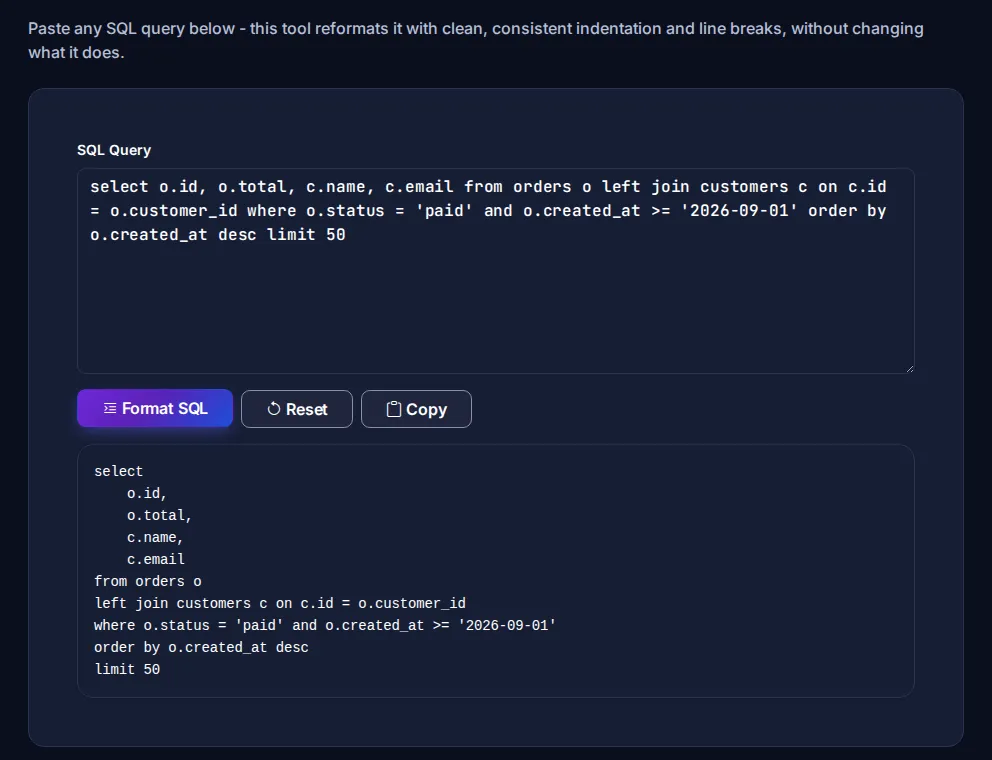
The formatter puts clauses such as SELECT, FROM, JOIN, WHERE, GROUP BY, ORDER BY and LIMIT on their own lines, and splits comma-separated lists onto indented lines. It does not re-case keywords or re-flow AND/OR conditions - those are style choices covered in the rules below. It never touches the contents of quoted strings - a 'where' inside a value stays a value. It runs in your browser, so queries containing real table names and data stay private.
Formatting is not validation. To catch syntax errors, use the SQL Validator.
Five rules that make SQL readable
1. One clause per line
SELECT, FROM, each JOIN, WHERE, GROUP BY, HAVING, ORDER BY and LIMIT each start a new line. Your eye can jump straight to the part you care about.
2. One column per line in long SELECT lists
It makes diffs in code review far cleaner: adding a column changes one line instead of rewriting the whole list.
3. Uppercase keywords, lowercase names
SQL does not care, but readers do. SELECT name FROM users separates the language from your data at a glance. Pick a style and stick to it across the team.
4. Meaningful aliases
orders o and customers c are fine. a, b, t1 and t2 in a five-table join are not.
5. Put the join condition with the join
Write JOIN customers c ON c.id = o.customer_id, not a comma-join with the condition buried in WHERE. Forgetting a condition in the old comma style silently produces a cross join - every row multiplied by every other row.
When you need the opposite
For embedding a query in code or config, the SQL Minifier collapses it back to a single line.
More SQL helpers
- SQL JOIN Builder - build joins without mixing up LEFT and RIGHT.
- SQL WHERE Builder - assemble filter conditions.
- CSV to SQL - turn a spreadsheet into INSERT statements (pairs well with our CSV guide).
- MySQL data type reference and PostgreSQL data type reference.
If your team wants a written standard, Simon Holywell's SQL Style Guide is a widely used starting point.