How to Find Who Owns a Domain (WHOIS, RDAP and Expiry Dates)
By Byteary Team · Sep 5, 2026 · 4 min read
There are plenty of good reasons to look up a domain: you want to buy it, you think a look-alike domain is being used for phishing, a client has lost track of where their domain is registered, or you simply want to know when yours expires. The lookup takes seconds. Understanding the result takes a little more.
WHOIS and RDAP in plain terms
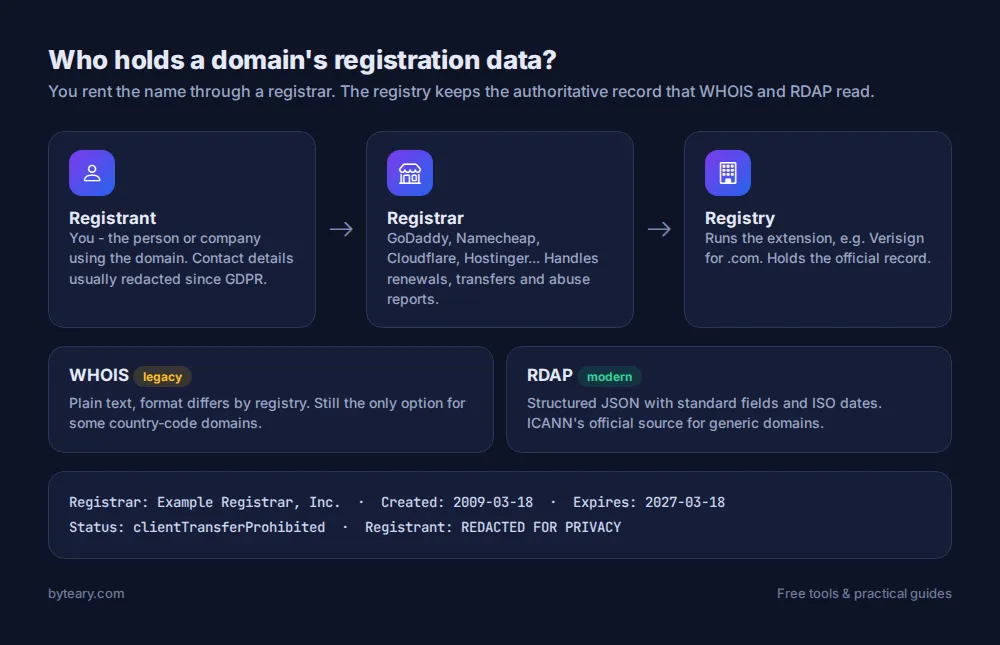
Every domain is registered through a registrar (GoDaddy, Namecheap, Cloudflare, Hostinger and so on) and recorded by the registry that runs its extension (Verisign for .com, for example). Both publish some of that registration data.
WHOIS is the original way to query it - a plain-text protocol from the early internet, where each registry formats its answer differently. RDAP is its modern replacement: the same information as structured JSON, with consistent field names and dates. ICANN now treats RDAP as the official source for generic domains.
How to run a lookup
- Open the WHOIS / RDAP Lookup.
- Enter just the domain -
example.com, withouthttps://or a path. - Click WHOIS Lookup. The tool uses RDAP where the registry supports it and falls back to WHOIS where it does not.
If you only need one detail, there are faster single-purpose tools: Domain Expiry Checker, Domain Age Checker and Registrar Lookup.
What you will see
- Registrar - the company the domain is registered through. This is who to contact about transfers, renewals and abuse.
- Creation date - when the domain was first registered. A "bank" domain created last week is a red flag.
- Expiry date - when the current registration period ends.
- Nameservers - which DNS provider answers for the domain (see DNS records explained).
- Status codes - the locks and states applied to the domain.
Where did the owner's name go?
If you remember WHOIS showing names, phone numbers and home addresses, that changed in 2018. Privacy laws such as GDPR mean registrars now redact personal contact details by default, and many registrars add privacy protection for all customers. You will usually see "REDACTED FOR PRIVACY" or the name of a privacy service instead.
So how do you contact an owner? Most redacted records include a contact form link or an anonymised email address that forwards to the registrant. For abuse (phishing, malware), report to the registrar's abuse contact, which is always published. Law enforcement and rights holders can request the underlying data through the registrar.
The WHOIS Privacy Checker tells you quickly whether a domain's details are hidden.
Status codes decoded
| Status | What it means |
|---|---|
clientTransferProhibited | Normal lock that stops unauthorised transfers. Good to have. |
clientDeleteProhibited / clientUpdateProhibited | Extra locks against deletion or changes. |
autoRenewPeriod | Just renewed automatically; can often still be refunded. |
redemptionPeriod | Expired and deleted by the registrar. The owner can still restore it, usually for a large fee. |
pendingDelete | About to be released. Nobody can restore it now; it becomes available within days. |
ICANN keeps the full list with explanations on its EPP status codes page.
Protect your own domains
Losing a domain to expiry is more common than you would think - a card expires, a reminder goes to an old email address, and the website and every mailbox on it stop working at once. Three habits prevent it:
- Turn on auto-renew and keep the payment card current.
- Make sure the registrant email is an address you still read.
- Check expiry dates for all your domains once a quarter with the Domain Expiry Checker.
Want to see whether a name is free before you start? Try the Domain Availability Checker. And for the official, registry-backed version of any lookup, ICANN runs its own registration data lookup.