DNS Records Explained: A, AAAA, CNAME, MX, TXT and NS
By Byteary Team · Aug 21, 2026 · 5 min read
DNS is the part of the internet nobody thinks about until it breaks. Then the website shows the old server, email bounces, or a new subdomain refuses to appear. Nearly every one of those problems comes down to a single record being wrong or missing.
You do not need to be a network engineer to read DNS. There are only a handful of record types that matter day to day.
How a lookup works, in one paragraph
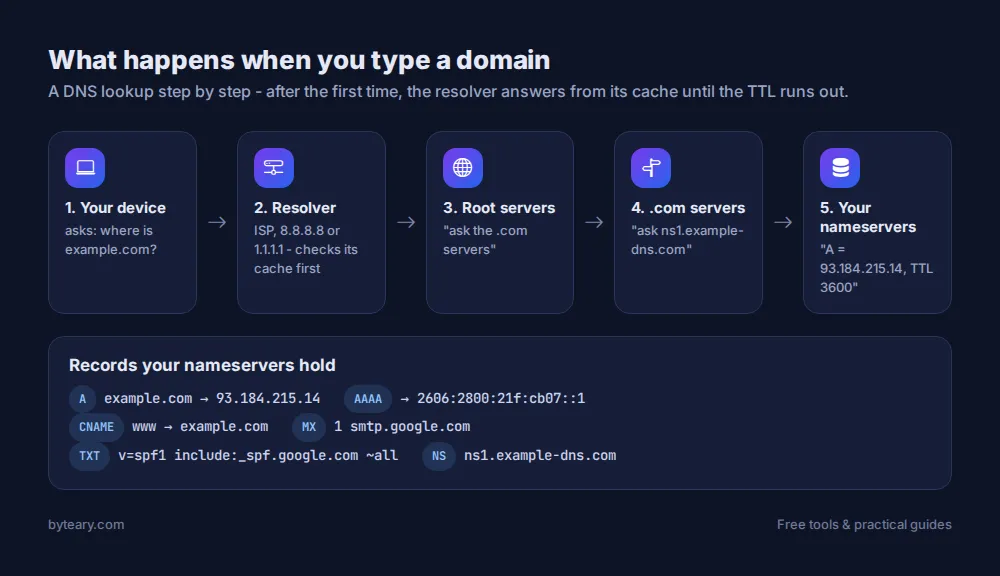
When someone types your domain, their device asks a resolver (usually run by their internet provider, or a public one like Google's 8.8.8.8 or Cloudflare's 1.1.1.1). The resolver asks the root servers, which point it to the servers for .com, which point it to your domain's nameservers. Your nameservers give the final answer - and the resolver caches that answer for as long as the record's TTL says.
The record types you will actually use
A record - domain to IPv4 address
example.com. 3600 IN A 93.184.215.14The most basic record: it points a name at a server's IPv4 address. When you move hosting, this is usually the record you change.
AAAA record - domain to IPv6 address
The same thing for IPv6. If you publish an AAAA record, make sure the server actually answers on that address - visitors with IPv6 will try it first.
CNAME record - an alias
www.example.com. 3600 IN CNAME example.com.Says "this name is the same as that name". It is common for www, and for services like shops or help desks that give you a hostname to point at. A CNAME cannot sit on the root domain alongside other records, which is why many DNS hosts offer a special "ALIAS" or "flattened" record for that case.
MX record - where email goes
example.com. 3600 IN MX 1 smtp.google.com.Lists the mail servers for the domain, each with a priority number (lower is tried first). No MX record, no incoming email.
TXT record - text for verification and email security
A free-form text record. In practice it holds domain-verification codes (Google Search Console, Microsoft 365) and email authentication policies. SPF lives here, and so do DKIM keys and DMARC policies - we explain those in SPF, DKIM and DMARC explained.
NS record - who is in charge
Names the nameservers that hold the domain's records. If you edit records at one provider but the NS records point to another, your edits do nothing. This is one of the most common "I changed it and nothing happened" causes.
SOA and CAA
The SOA record holds administrative details for the zone, including a serial number that changes on each edit. CAA records list which certificate authorities may issue SSL certificates for your domain - a small, useful safeguard.
What TTL means (and why changes "take time")
TTL, time to live, is how many seconds a resolver may cache the answer. With a TTL of 3600, a resolver that looked up your domain five minutes ago will keep using the old answer for up to another 55 minutes.
That is all "DNS propagation" really is: caches around the world expiring at different times. A practical trick before a planned move is to lower the TTL to 300 a day in advance, make the change, and raise it again afterwards. The TTL Checker shows the current values.
How to check your records
- Open the DNS Lookup tool.
- Enter the domain (or a specific hostname such as
www.example.com). - Click Look Up DNS. You get A, AAAA, CNAME, MX, TXT, NS, SOA and CAA records in one view. "No records found" for a type is normal - not every domain uses every record.
If you only need one type, there are dedicated lookups: A, MX, TXT, CNAME and NS.
Just changed a record? Check propagation
The DNS Propagation Checker asks several major public resolvers (Google, Cloudflare and Quad9) for the same record. If they disagree, some caches have not expired yet - wait for the old TTL to run out. If they all show the old value long after that, the change was probably made at the wrong provider; check the NS records.
A quick troubleshooting guide
| Problem | Check first |
|---|---|
| Site shows the old host after a move | A / AAAA records, then TTL |
| www works but the bare domain does not (or vice versa) | A record on the root, CNAME on www |
| Email not arriving | MX records |
| Email arriving in spam | TXT records (SPF, DMARC) and DKIM |
| Record changes have no effect | NS records - are you editing at the right provider? |
| SSL certificate will not issue | CAA records and the A record |
If you want to go deeper, Cloudflare's What is DNS? guide is an excellent illustrated primer. And if the question is who owns a domain rather than where it points, see our guide to WHOIS and RDAP lookups.