How to Create a Strong Password You Can Actually Use
By Byteary Team · Aug 24, 2026 · 4 min read
Password advice has a reputation for being annoying and contradictory. Change it every 30 days. Add a symbol. No, use a passphrase. Much of the old advice has since been dropped by the people who wrote it. What is left is simple, and it works.
What actually makes a password strong
An attacker who steals a database of password hashes does not guess your password by hand. They run billions of guesses per second, starting with leaked passwords, dictionary words, names and keyboard patterns, then common tweaks of those (Password1!, Summer2026). A password is strong when it does not appear in any of those lists and would take too long to reach by brute force.
Two things get you there:
- Length. Each extra character multiplies the number of possibilities. A random 16-character password is vastly harder to brute-force than a random 8-character one - not twice as hard, but billions of times.
- Randomness. A password you invent tends to follow patterns people share. A password generated by a machine does not.
The US standards body NIST says the same in its digital identity guidelines: favour length, check new passwords against lists of known breached ones, and stop forcing regular changes unless there is a sign of compromise.
The real danger is reuse
Most accounts are not broken by clever cracking. They are opened with a password that leaked from a completely different site. Attackers take email and password pairs from one breach and try them everywhere else - email, banking, social media. It is called credential stuffing, and it works because people reuse passwords.
One unique password per account matters more than anything else in this article.
Generate one in a few seconds
- Open the Secure Password Generator.
- Set the length. The default is 16; anything from 16 up is a good choice for important accounts.
- Keep uppercase, lowercase, numbers and symbols ticked unless a site rejects symbols.
- Click Generate Password, then Copy, and paste it straight into your password manager.
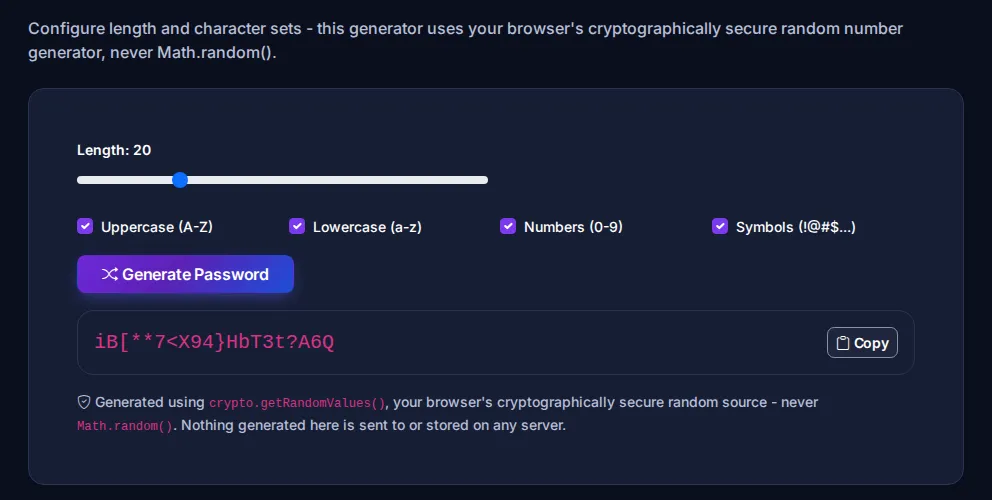
Nothing is sent to a server - the password is created on your own device, and closing the tab discards it.
For passwords you must remember: use a passphrase
You still need a few passwords you can type from memory: your computer login, your password manager's master password, perhaps your main email. For these, use four or five random, unrelated words:
lantern-orbit-maple-crisp-harbourIt is long, easy to type on a phone, and far stronger than Tr0ub4dor&3. The words must be genuinely random - a line from a song or a sentence about yourself is not.
Check a password you already have
The Password Strength Checker scores a password as you type and tells you what is holding it back: too short, no mixed case, repeated characters, keyboard patterns like qwerty, or a password from the most-used lists. Like the generator, it works entirely in your browser.
A good habit is to test the pattern, not your real password - for example, check Summer2026! to see why that style is weak, rather than pasting a password you actually use.
If you want the maths behind the score, the Password Entropy Calculator shows the estimated bits of entropy for a given length and character set.
Three things to do today
- Install a password manager. Bitwarden, 1Password, KeePassXC and the managers built into Apple and Google devices are all fine. The best one is the one you will use.
- Change reused passwords - starting with email, because email resets everything else.
- Turn on two-factor authentication for email, banking and anything with payment details. An authenticator app or passkey is better than SMS.
For developers: never store passwords in plain text
If you build login systems, store only a slow, salted hash made with bcrypt, Argon2id or scrypt - never MD5 or plain SHA-256. Our generators for bcrypt and Argon2id are useful for creating test hashes, and the OWASP Password Storage Cheat Sheet covers the recommended settings.
Passwords are one layer. If you run a website, the next step is making sure it is served securely - see how to check an SSL certificate.