How to Keep a Changelog: Format, Categories and Examples
By Byteary Team · Sep 20, 2026 · 3 min read
A changelog answers one question for the people who use your software: "what changed, and do I need to do anything?" A Git log cannot answer it - it is full of "fix typo" and "WIP" commits and written for developers, not users. A curated CHANGELOG.md can.
The Keep a Changelog format
The most widely used convention is Keep a Changelog. A file following it looks like this:
# Changelog

All notable changes to this project are documented in this file.

## [Unreleased]

### Added
- Bulk export of invoices as a ZIP file

## [1.4.0] - 2026-09-20

### Added
- CSV export for reports
- Dark mode for the dashboard

### Fixed
- Login redirect loop on Safari

### Security
- Upgrade jsonwebtoken to 9.0.2

## [1.3.1] - 2026-08-02

### Fixed
- Totals rounding error for amounts in JPY

[Unreleased]: https://github.com/acme/invoice-kit/compare/v1.4.0...HEAD
[1.4.0]: https://github.com/acme/invoice-kit/compare/v1.3.1...v1.4.0
[1.3.1]: https://github.com/acme/invoice-kit/compare/v1.3.0...v1.3.1
The rules behind it are simple: newest version first, one section per release, dates in YYYY-MM-DD format, and entries grouped by type.
The six types of change
| Heading | Use it for |
|---|---|
| Added | New features. |
| Changed | Changes to existing behaviour. |
| Deprecated | Features that will be removed in a future release. |
| Removed | Features removed in this release. |
| Fixed | Bug fixes. |
| Security | Fixes for vulnerabilities - so users know to upgrade urgently. |
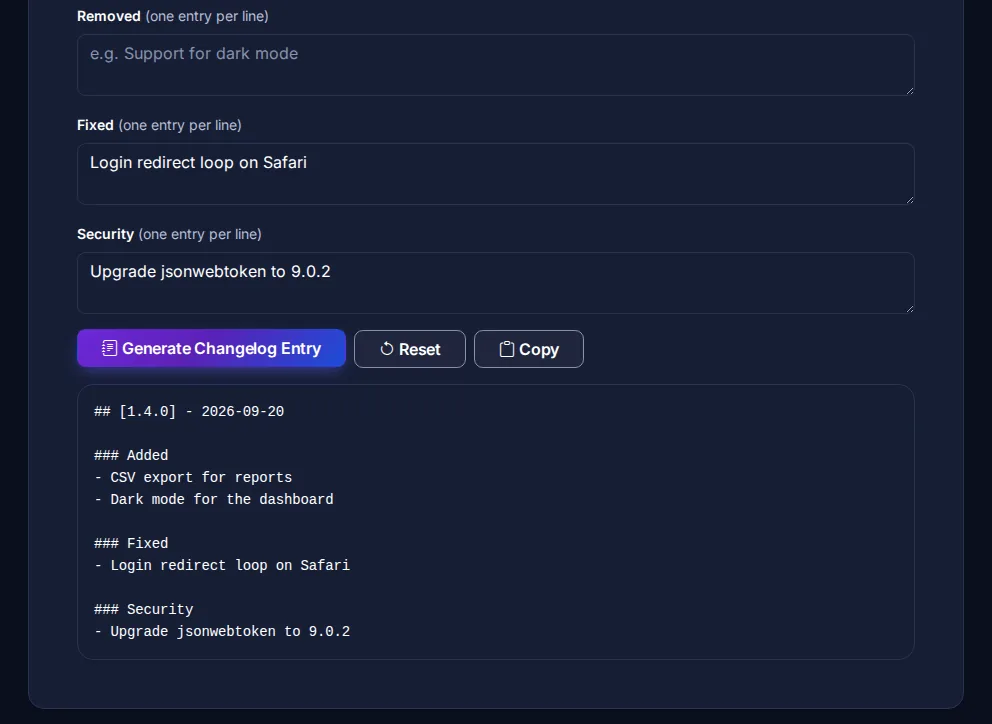
The CHANGELOG Generator gives you a box for each type and writes the release section in this format - leave a box empty and its heading is left out.
The Unreleased section
Keep an ## [Unreleased] section at the top and add an entry in the same pull request as the change. At release time you rename it to the new version and date, and start a fresh Unreleased section. This turns "writing the release notes" from an hour of archaeology into a two-minute edit.
Changelogs and version numbers
The change types map neatly onto Semantic Versioning:
- Anything under Removed, or a Changed entry that breaks existing use, means a new major version.
- Added or Deprecated means at least a minor version.
- Only Fixed or Security means a patch version.
Not sure what the next number should be? The Version Increment Generator works it out, and the Git Tag Generator writes the tag command.
Generate it from commits?
If your team writes Conventional Commits - feat: ..., fix: ... - tools such as release-please or semantic-release can draft the changelog automatically. That works well, with one caveat: commit messages are written for reviewers, so read the generated notes and rewrite anything a user would not understand. The Git Commit Message Generator helps you write commits in that format.
Common mistakes
- Dumping the Git log. Merge commits and refactors are noise to users.
- Vague entries. "Bug fixes and improvements" tells nobody anything.
- Hiding breaking changes. Put them first, and say what users must change.
- Forgetting security fixes. A Security entry is how users know an upgrade is urgent.