How to Write a Meta Title and Description That Get Clicks
By Byteary Team · Sep 7, 2026 · 4 min read
Ranking on the first page is only half the job. The searcher still has to choose you over nine other results, and they decide in about a second, based almost entirely on two lines of text: your title and your description.
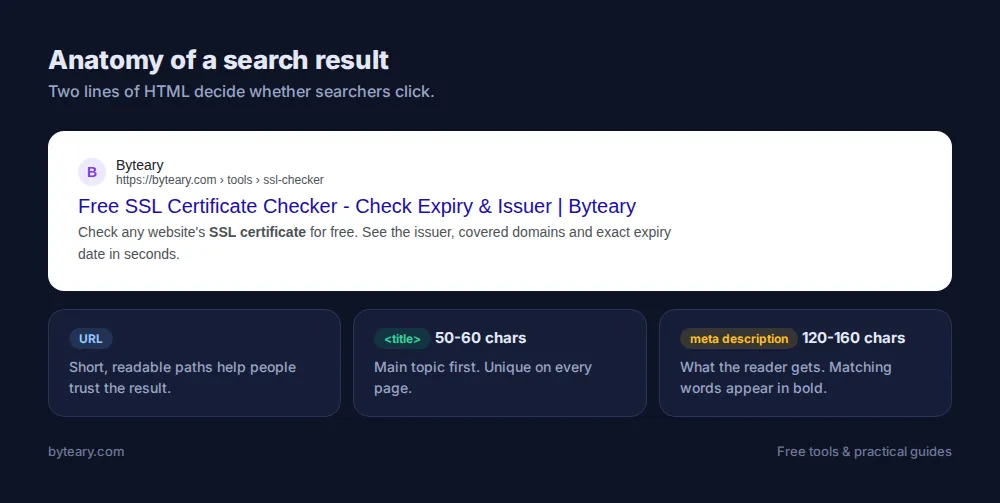
Where they live
<title>Free SSL Certificate Checker - Check Expiry & Issuer | Byteary</title>
<meta name="description" content="Check any website's SSL certificate for free. See the issuer, covered domains and exact expiry date in seconds.">
Most CMSs and SEO plugins give you fields for both, so you rarely need to edit HTML directly.
Writing the title
Length: about 50-60 characters
Google cuts titles by pixel width, not character count, but around 60 characters is a reliable limit. Anything after that becomes "...". The Meta Title Checker flags titles outside the 30-60 character range.
Put the main topic first
People scan the first few words. "SSL Certificate Checker - Free Tool" works better than "Welcome to Our Website's Free Online SSL Certificate Checker Tool".
Make every title unique
Ten pages titled "Home | Company Name" tell Google nothing about which page answers which search.
Give a reason to click
Specific beats generic: "in 30 Seconds", "(2026 Guide)", "With Examples", "Free, No Sign-Up". Only promise what the page delivers.
Writing the description
Length: about 120-160 characters
Long enough to say something useful, short enough not to be cut. The Meta Description Checker uses a 70-160 character range.
Answer "what will I get?"
Summarise the benefit, not the page. Compare:
| Weak | Better |
|---|---|
| This page is about our JSON formatter tool which you can use online. | Paste messy JSON and get clean, indented output instantly. Finds syntax errors too. Free and runs in your browser. |
| Read our blog post about passwords. | Why length beats symbols, how to generate unique passwords in seconds, and the three habits that stop most account takeovers. |
Include the phrase people search for - naturally
Google often bolds words that match the search, which draws the eye. Use the phrase once. Stuffing it in three times reads badly and does not help.
Why Google sometimes shows something else
Google rewrites titles it considers too long, stuffed with keywords or unhelpful, and often builds its own snippet from your page text when that matches the search better. Descriptions are not a direct ranking factor. You still want a good one, because it is used most of the time and it affects clicks. Google explains its approach in its guides to title links and snippets.
Preview before you publish
The Meta Tags Preview reads a live page and shows it as a Google result and as a social media card. It is the quickest way to spot a title that gets cut off, a missing description, or a share card without an image.
Do not forget social sharing
When someone shares your page on WhatsApp, LinkedIn, Facebook or X, those platforms read Open Graph tags, not your meta description:
<meta property="og:title" content="...">
<meta property="og:description" content="...">
<meta property="og:image" content="https://example.com/share.jpg">
Without og:image, most platforms show a blank or generic card. Check with the Open Graph Checker and Twitter Card Checker.
A 10-minute audit for your key pages
- List your ten most important pages.
- Run each through the title and description checkers.
- Fix missing, duplicate and cut-off ones first.
- Rewrite the rest to lead with the topic and end with a reason to click.
Titles and descriptions only matter if Google can crawl and index the page in the first place - see our guide to robots.txt and XML sitemaps.