robots.txt and XML Sitemaps: A Beginner's Guide That Avoids the Big Mistakes
By Byteary Team · Sep 11, 2026 · 4 min read
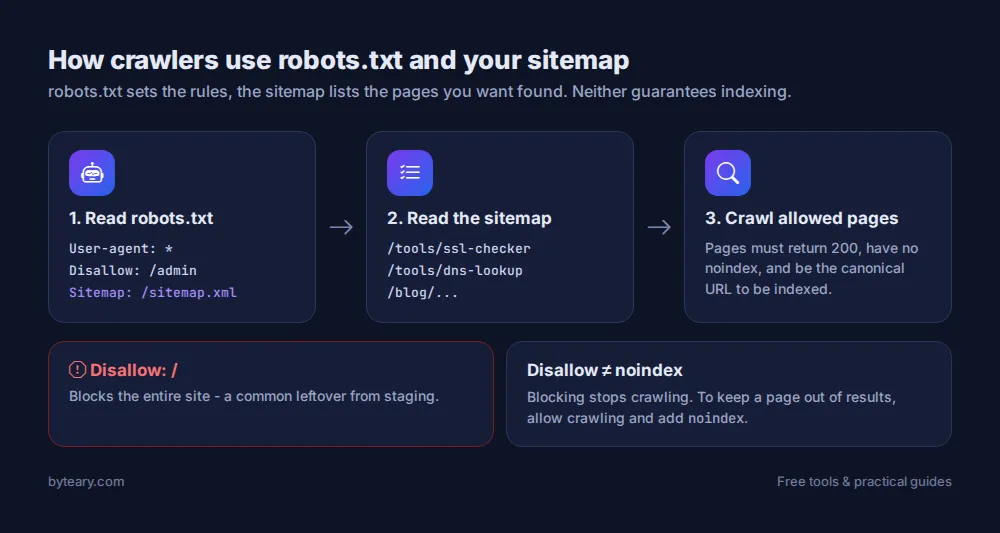
robots.txt and the XML sitemap are the two files search engines look for first. One says where crawlers may go; the other lists the pages you want found. Both are simple. Both can also cause serious damage with a single wrong line - the classic story is a site relaunched with the staging server's Disallow: / still in place, and traffic vanishing over the following weeks.
robots.txt: the rules for crawlers
It is a plain-text file at the root of your domain - always https://yourdomain.com/robots.txt. A sensible file for most sites looks like this:
User-agent: *
Allow: /

Disallow: /admin
Disallow: /login
Disallow: /cart

Sitemap: https://yourdomain.com/sitemap.xml
User-agent: *- the rules below apply to all crawlers.Disallow: /admin- do not crawl anything starting with/admin.Sitemap:- where to find your sitemap. Use the full URL.
An empty or missing robots.txt is fine - crawlers then assume everything is allowed.
The mistakes that hurt
| Line | What it actually does |
|---|---|
Disallow: / | Blocks the entire site |
Disallow: (empty) | Blocks nothing - the opposite of what many people expect |
Disallow: /*.css or /*.js | Stops Google rendering your pages properly |
Disallow: /blog | Also blocks /blog-news and /blogging-tips - rules are prefixes |
Check your live file with the Robots.txt Checker. It fetches the file, shows the rules and tells you whether a sitemap is declared.
Blocking crawling is not the same as blocking indexing
This is the most misunderstood point in technical SEO. Disallow stops Google fetching a page. If other sites link to it, the URL can still appear in search results - just without a description.
To keep a page out of search results, let it be crawled and add a noindex tag:
<meta name="robots" content="noindex">Do not block that page in robots.txt as well - if Google cannot fetch it, it never sees the noindex. The Indexability Checker looks at the status code, the robots meta tag and the X-Robots-Tag header together.
And robots.txt is not security. It is a public file that politely asks well-behaved bots to stay out; it does nothing to stop anyone else. Protect private areas with a login.
XML sitemaps: the list of pages you care about
<?xml version="1.0" encoding="UTF-8"?>
<urlset xmlns="http://www.sitemaps.org/schemas/sitemap/0.9">
  <url>
    <loc>https://yourdomain.com/tools/ssl-checker</loc>
    <lastmod>2026-09-01</lastmod>
  </url>
</urlset>
A sitemap does not force anything into Google's index. It helps Google discover pages - especially new ones, and ones that are not well linked from the rest of your site.
What belongs in it
- Only pages that return 200, that you want indexed, and that are the canonical version.
- No redirects, no 404s, no noindexed pages, no duplicate URLs with tracking parameters.
- Up to 50,000 URLs per file. Larger sites use a sitemap index pointing to several sitemaps.
Most CMSs generate the sitemap automatically. Ideally yours updates itself whenever you publish, so you never have to maintain it by hand.
Check that yours is reachable with the Sitemap Checker. It looks at the standard /sitemap.xml location; if your CMS uses another path such as /sitemap_index.xml, make sure it is listed in robots.txt.
Tell Google about it
- Add the
Sitemap:line to robots.txt. - Submit the sitemap URL in Google Search Console and Bing Webmaster Tools.
- Check the "Pages" report in Search Console after a few days to see what was indexed - and why other pages were not.
A five-minute launch checklist
- robots.txt does not contain
Disallow: /. - Key pages pass the Indexability Checker (no leftover noindex from staging).
- The sitemap loads and is declared in robots.txt.
- Canonical tags point to the right URLs - see the Canonical URL Checker.
- Old URLs redirect with 301s - our guide to HTTP status codes explains why.
Google documents both files in detail: introduction to robots.txt and sitemaps overview.