Kubernetes CronJob YAML: A Complete Example (Schedule, Time Zone, Retries)
By Byteary Team · Sep 4, 2026 · 4 min read
A Kubernetes CronJob is the cluster's version of a crontab line: "run this container on this schedule". The minimal manifest is short, but the defaults decide what happens when a run is slow, fails, or is missed - and those defaults are not always what you want for a nightly backup or a billing job. Here is a complete example, then each part explained.
A complete CronJob manifest
apiVersion: batch/v1
kind: CronJob
metadata:
  name: db-backup
spec:
  schedule: "30 2 * * *"
  timeZone: "Europe/London"
  concurrencyPolicy: Forbid
  startingDeadlineSeconds: 600
  successfulJobsHistoryLimit: 3
  failedJobsHistoryLimit: 5
  jobTemplate:
    spec:
      backoffLimit: 2
      activeDeadlineSeconds: 3600
      ttlSecondsAfterFinished: 86400
      template:
        spec:
          restartPolicy: OnFailure
          containers:
            - name: db-backup
              image: postgres:16-alpine
              command: ["/scripts/backup.sh", "--target", "s3"]
              envFrom:
                - secretRef:
                    name: db-backup-credentials
This runs a backup at 02:30 London time every night, never starts a second copy while one is still running, retries a failed run twice, and gives up on a run that takes longer than an hour. The Kubernetes CronJob Generator gives you the skeleton - name, schedule, image and command - to paste into your own manifest.
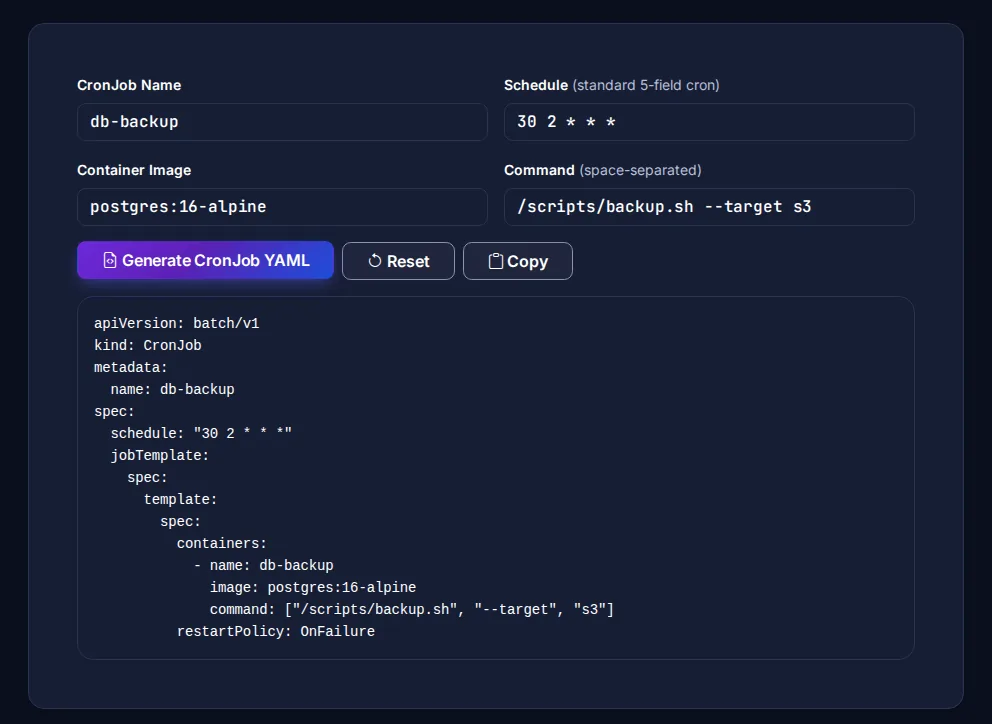
The schedule and time zone
schedule uses the standard five cron fields - minute, hour, day of month, month, day of week - so 30 2 * * * means 02:30 every day and 0 */6 * * * means every six hours. Kubernetes also accepts the shortcuts @hourly, @daily, @weekly, @monthly and @yearly. If cron syntax is new to you, our cron expressions guide covers every field, and the Cron Expression Builder shows the next run times for any expression.
Without timeZone, the schedule is interpreted in the time zone of the kube-controller-manager, which on managed clusters is usually UTC. Set timeZone to an IANA name such as Asia/Kolkata or America/New_York (stable since Kubernetes 1.27) so the job follows local time, including daylight saving changes. Do not put CRON_TZ= or TZ= inside the schedule string - that is not supported. The official CronJob documentation lists the details.
What happens when runs overlap or are missed
| Field | Default | What it controls |
|---|---|---|
concurrencyPolicy | Allow | Allow runs overlapping jobs, Forbid skips the new run while the old one is active, Replace stops the old run and starts the new one. |
startingDeadlineSeconds | none | How late a missed run may still start (for example after the controller was down). Older misses are skipped. |
suspend | false | Set to true to pause future runs without deleting the CronJob. |
successfulJobsHistoryLimit | 3 | How many finished Jobs to keep for inspection. |
failedJobsHistoryLimit | 1 | How many failed Jobs to keep - raise it so you can read the logs of recent failures. |
For backups, migrations and anything that writes shared data, Forbid is almost always right: two backups writing the same file at once is worse than one skipped run.
Retries and time limits
Inside jobTemplate.spec, backoffLimit (default 6) is how many times Kubernetes retries a failing pod before marking the Job failed, with an increasing delay between attempts. activeDeadlineSeconds stops a run that hangs, and ttlSecondsAfterFinished cleans the finished Job and its pods up automatically.
The pod's restartPolicy must be OnFailure or Never - a Job cannot use Always. With OnFailure the container restarts in the same pod; with Never each retry is a new pod, which keeps the logs of every attempt.
Make the job itself safe to run twice. Even with Forbid, Kubernetes documents that a CronJob can occasionally create two Jobs for one schedule, or none, so a backup should write to a timestamped name and a billing job should check whether the period was already processed.
Testing a CronJob without waiting
You do not need to wait until 02:30 to see whether it works. Create a one-off Job from the CronJob's template:
kubectl apply -f db-backup.yaml
kubectl create job --from=cronjob/db-backup db-backup-manual-1
kubectl logs -f job/db-backup-manual-1
kubectl get cronjob db-backup   # shows LAST SCHEDULE and ACTIVE
Before applying, check the YAML with the Kubernetes Manifest Validator. Keep credentials in a Secret, as in the example - the Kubernetes Secret Generator writes one - rather than in the command line, where they show up in kubectl describe.
Quick checklist
- Schedule has five fields and the right
timeZone. concurrencyPolicy: Forbidfor jobs that must not overlap.backoffLimitandactiveDeadlineSecondsset to sensible values.failedJobsHistoryLimithigh enough to debug failures.- The job is idempotent and has been run once by hand.
Running the same job on AWS instead? EventBridge uses a six-field cron format with its own rules - see AWS EventBridge cron expressions.